볼린저 밴드를 사용하다 보면 이런 경험이 있을 겁니다.
"스퀴즈 패턴은 확인했는데, 언제 돌파할지 모르겠어."
"밴드 터치했다고 매매했더니 거짓 신호였어."
스퀴즈 모멘텀 (Squeeze Momentum Indicator)은 이 문제를 해결하기 위해 존 카터(John Carter)가 개발한 고급 지표입니다.
볼린저 밴드만으로는 부족하다
볼린저 밴드는 훌륭한 지표지만, 치명적인 한계가 있습니다.
볼린저 밴드의 3가지 한계
- 거짓 신호 빈번 - 밴드 터치만으로는 반전 확신 어려움
- 타이밍 불명확 - 스퀴즈 후 언제, 어느 방향으로 갈지 모름
- 모멘텀 측정 없음 - 단순히 변동성만 측정할 뿐 추세 강도는 알 수 없음
스퀴즈 모멘텀은 여기에 켈트너 채널과 모멘텀 히스토그램을 추가하여 이 문제들을 해결합니다.
켈트너 채널이란?
스퀴즈 모멘텀을 이해하려면 먼저 켈트너 채널을 알아야 합니다.
켈트너 채널 vs 볼린저 밴드
| 구분 | 볼린저 밴드 (BB) | 켈트너 채널 (KC) |
|---|---|---|
| 중심선 | 20일 SMA | 20일 EMA |
| 상단/하단 | ± (표준편차 × 2) | ± (ATR × 1.5) |
| 변동성 반응 | 급격히 확장/축소 | 부드럽게 변화 |
| 특징 | 변동성 측정 | 추세 판단 |
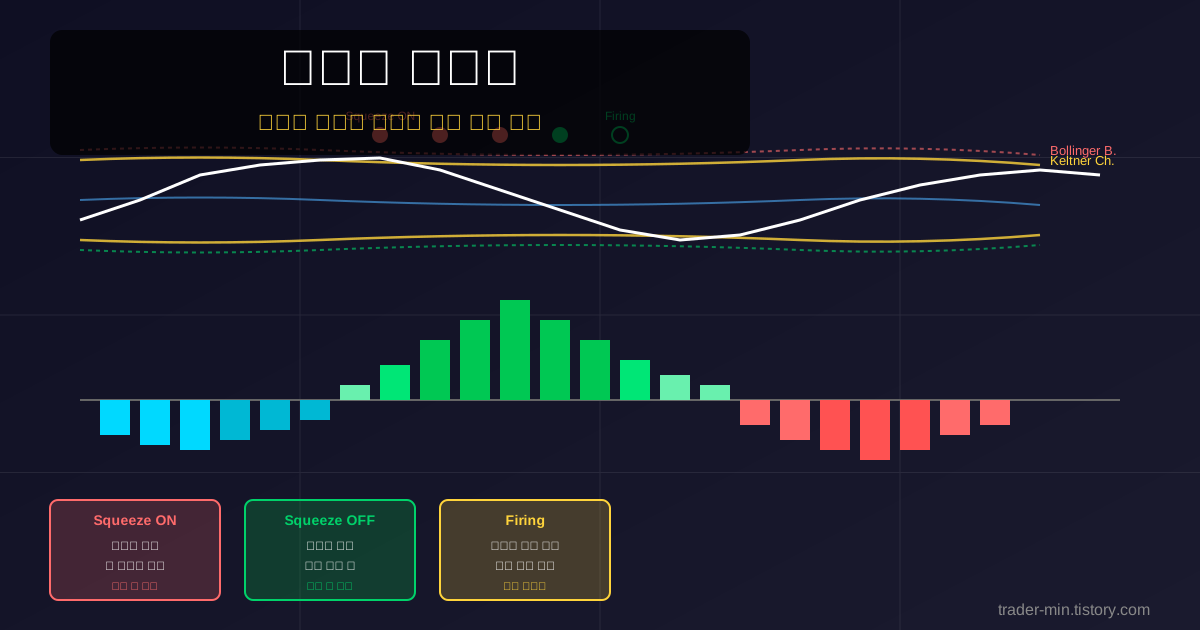
핵심 아이디어: 볼린저 밴드가 켈트너 채널 안으로 들어가면 변동성이 극도로 축소된 상태입니다.
스퀴즈의 4가지 상태
스퀴즈 모멘텀의 가장 큰 장점은 스퀴즈 상태를 명확히 구분한다는 것입니다.
1. Normal (정상)
상태: BB가 KC보다 넓음
표시: 초록 빈 점
의미: 정상 변동성, 추세 진행 중
전략: 추세 추종
2. Squeeze ON (스퀴즈 발생)
상태: BB가 KC 안쪽에 있음
표시: 빨간 점
의미: 변동성 극도로 축소, 에너지 축적 중
전략: 대기, 돌파 준비
3. Firing (점화)
상태: 스퀴즈 해제 직후 (ON → OFF 전환)
표시: 첫 번째 초록 점
의미: 폭발 시작, 가장 중요한 신호
전략: 진입 타이밍!
4. Squeeze OFF (스퀴즈 해제)
상태: BB가 KC보다 계속 넓음
표시: 초록 빈 점
의미: 추세 진행 중
전략: 추세 유지
핵심: Firing 신호 (첫 번째 초록 점)가 가장 중요합니다. 이때가 진입 타이밍입니다.
모멘텀 히스토그램 색상 해석
스퀴즈 상태만으로는 방향을 알 수 없습니다. 모멘텀 히스토그램이 어느 방향으로 갈지 알려줍니다.
양수 모멘텀 (상승)
- Dark Green (진한 초록) - 강한 상승 모멘텀, 매수 유지
- Light Green (연한 초록) - 상승 모멘텀 약화, 청산 고려
음수 모멘텀 (하락)
- Dark Red (진한 빨강) - 강한 하락 모멘텀, 관망
- Light Red (연한 빨강) - 하락 모멘텀 약화, 숏 청산
- Cyan (청록) - 하락 약화 중, 반등 준비
색상 전환의 의미
- Red → Cyan: 하락 → 반등 시작
- Cyan → Green: 반등 → 상승 전환 (매수 타이밍)
- Dark Green → Light Green: 상승 약화 (청산 고려)
- Green → Red: 상승 → 하락 전환 (매도 타이밍)
실전 진입 & 청산 타이밍
이론은 충분합니다. 실전에서 어떻게 매매하는지 보겠습니다.
매수 진입 조건 (3가지 모두 충족)
- Squeeze ON 상태 확인 (빨간 점 3~4개 이상)
- Firing 신호 발생 (첫 번째 초록 점)
- 모멘텀 히스토그램 양수 + Green (상승 방향 확인)
청산 조건 (하나라도 충족 시)
- 모멘텀 색상이 Light Green으로 변함 (상승 약화)
- 모멘텀이 0선 하향 돌파 (추세 전환)
- 목표가 도달 (스퀴즈 해제 후 평균 10~20% 수익)
매도 진입 조건 (숏 포지션)
- Squeeze ON 상태 확인
- Firing 신호 발생
- 모멘텀 히스토그램 음수 + Red (하락 방향 확인)
Pine Script v5 코드
실제로 트레이딩뷰에서 사용할 수 있는 파인스크립트 코드입니다.
주요 기능:
- 볼린저 밴드 + 켈트너 채널 자동 계산
- 스퀴즈 ON/OFF 상태 점으로 표시
- Firing 신호 라벨 자동 표시
- 모멘텀 히스토그램 5가지 색상 자동 변경
- 선형 회귀 기반 모멘텀 계산
- 알림(Alert) 기능 내장
- 우측 상단 정보 테이블
// This Pine Script code is subject to the terms of the Mozilla Public License 2.0
// trader-min.tistory.com
// Based on TTM Squeeze by John Carter

//@version=5
indicator("Squeeze Momentum", shorttitle="Squeeze", overlay=false)

// ========== INPUTS ==========
length = input.int(20, "Length", minval=1, tooltip="BB and KC period")
bbMult = input.float(2.0, "BB Mult", minval=0.1, step=0.1)
kcMult = input.float(1.5, "KC Mult", minval=0.1, step=0.1)

momLength = input.int(20, "Momentum Length", minval=1, group="Momentum")
momSource = input.source(close, "Momentum Source", group="Momentum")

// Colors
sqzOnColor = input.color(color.new(#ff6b6b, 0), "Squeeze ON", group="Colors")
sqzOffColor = input.color(color.new(#00d26a, 0), "Squeeze OFF", group="Colors")
darkGreen = input.color(color.new(#00c853, 0), "Dark Green", group="Colors")
lightGreen = input.color(color.new(#69f0ae, 0), "Light Green", group="Colors")
cyanCol = input.color(color.new(#00d9ff, 0), "Cyan", group="Colors")
lightRed = input.color(color.new(#ff8a80, 0), "Light Red", group="Colors")
darkRed = input.color(color.new(#ff5252, 0), "Dark Red", group="Colors")

// Display
showLabels = input.bool(true, "Show Firing Labels", group="Display")
enableAlerts = input.bool(true, "Enable Alerts", group="Alerts")

// ========== BOLLINGER BANDS ==========
basis = ta.sma(momSource, length)
dev = bbMult * ta.stdev(momSource, length)
upperBB = basis + dev
lowerBB = basis - dev

// ========== KELTNER CHANNEL ==========
kcBasis = ta.ema(momSource, length)
atrValue = ta.atr(length)
upperKC = kcBasis + (kcMult * atrValue)
lowerKC = kcBasis - (kcMult * atrValue)

// ========== SQUEEZE DETECTION ==========
sqzOn = (lowerBB > lowerKC) and (upperBB < upperKC)
sqzOff = (lowerBB < lowerKC) and (upperBB > upperKC)
noSqz = not sqzOn and not sqzOff

wasSqzOn = sqzOn[1]
firing = not sqzOn and wasSqzOn

// ========== MOMENTUM ==========
highestVal = ta.highest(high, momLength)
lowestVal = ta.lowest(low, momLength)
avgHL = (highestVal + lowestVal) / 2
momentum = ta.linreg(momSource - avgHL, momLength, 0)

momUp = momentum > momentum[1]
momDown = momentum < momentum[1]

// ========== COLORS ==========
posDarkGreen = momentum > 0 and momUp
posLightGreen = momentum > 0 and momDown
negCyan = momentum < 0 and momUp
negLightRed = momentum < 0 and momDown and momentum > momentum[2]
negDarkRed = momentum < 0 and momDown and momentum <= momentum[2]

momColor = posDarkGreen ? darkGreen : posLightGreen ? lightGreen : negCyan ? cyanCol : negLightRed ? lightRed : negDarkRed ? darkRed : color.gray

// ========== PLOTS ==========
plot(momentum, "Momentum", color=momColor, style=plot.style_histogram, linewidth=4)
hline(0, "Zero", color=color.new(color.gray, 50), linewidth=2)

sqzColor = sqzOn ? sqzOnColor : sqzOff ? sqzOffColor : color.gray
plotshape(true, "Squeeze", location=location.top, style=shape.circle, color=sqzColor, size=size.tiny)

if showLabels and firing
    label.new(bar_index, momentum, "FIRE", color=sqzOffColor, textcolor=color.white, style=label.style_label_down, size=size.small)

// ========== ALERTS ==========
if enableAlerts and sqzOn and not sqzOn[1]
    alert("Squeeze ON", alert.freq_once_per_bar_close)

if enableAlerts and firing
    alert("Firing", alert.freq_once_per_bar_close)

if enableAlerts and momentum > 0 and momentum[1] <= 0
    alert("Momentum Bullish", alert.freq_once_per_bar_close)

if enableAlerts and momentum < 0 and momentum[1] >= 0
    alert("Momentum Bearish", alert.freq_once_per_bar_close)

// ========== INFO TABLE ==========
var table infoTable = table.new(position.top_right, 2, 6, bgcolor=color.new(color.black, 85), border_width=1)

if barstate.islast
    table.cell(infoTable, 0, 0, "Squeeze", text_color=color.white, text_size=size.normal)
    sqzText = sqzOn ? "ON" : sqzOff ? "OFF" : "-"
    table.cell(infoTable, 1, 0, sqzText, text_color=sqzOn ? sqzOnColor : sqzOff ? sqzOffColor : color.gray, text_size=size.normal)

    table.cell(infoTable, 0, 1, "Momentum", text_color=color.white, text_size=size.small)
    table.cell(infoTable, 1, 1, str.tostring(momentum, "#.####"), text_color=momColor, text_size=size.small)

    table.cell(infoTable, 0, 2, "Direction", text_color=color.white, text_size=size.small)
    dirText = momentum > 0 ? "UP" : momentum < 0 ? "DOWN" : "FLAT"
    table.cell(infoTable, 1, 2, dirText, text_color=momentum > 0 ? darkGreen : momentum < 0 ? darkRed : color.gray, text_size=size.small)

    table.cell(infoTable, 0, 3, "Strength", text_color=color.white, text_size=size.small)
    strText = momUp ? "INC" : momDown ? "DEC" : "HOLD"
    table.cell(infoTable, 1, 3, strText, text_color=momUp ? darkGreen : momDown ? darkRed : color.gray, text_size=size.small)

    table.cell(infoTable, 0, 4, "Color", text_color=color.white, text_size=size.small)
    colName = posDarkGreen ? "DarkGreen" : posLightGreen ? "LightGreen" : negCyan ? "Cyan" : negLightRed ? "LightRed" : negDarkRed ? "DarkRed" : "Gray"
    table.cell(infoTable, 1, 4, colName, text_color=momColor, text_size=size.small)

    table.cell(infoTable, 0, 5, "Settings", text_color=color.white, text_size=size.small)
    table.cell(infoTable, 1, 5, str.tostring(length) + "/" + str.tostring(bbMult, "#.#") + "/" + str.tostring(kcMult, "#.#"), text_color=color.gray, text_size=size.small)
사용 방법
- 트레이딩뷰 Pine Editor 열기
- 위 코드 복사 → 붙여넣기
- Add to chart 클릭
- 설정에서 BB 승수, KC 승수 조절
- 색상 및 표시 옵션 설정
스퀴즈 모멘텀 실전 시나리오
시나리오 1: 상승 돌파
- 빨간 점 4개 확인 (스퀴즈 진행 중)
- 첫 번째 초록 점 발생 (Firing)
- 모멘텀 Dark Green 전환 → 매수 진입
- Light Green 전환 시 → 청산
시나리오 2: 하락 돌파
- 빨간 점 4개 확인
- 첫 번째 초록 점 발생
- 모멘텀 Dark Red 전환 → 관망 또는 숏
- Cyan 전환 시 → 숏 청산
시나리오 3: 거짓 신호 회피
- 빨간 점이 1~2개만 나타남 → 스퀴즈 불충분, 진입 자제
- Firing 후 모멘텀이 0선 근처 횡보 → 방향 불명확, 대기
- Light Green 또는 Light Red 색상 → 약한 모멘텀, 진입 자제
볼린저 밴드와의 차이점
| 구분 | 볼린저 밴드 | 스퀴즈 모멘텀 |
|---|---|---|
| 스퀴즈 확인 | 육안으로 판단 | 점으로 명확히 표시 |
| 돌파 시점 | 불명확 | Firing 신호로 명확 |
| 방향 판단 | 없음 | 모멘텀 색상으로 확인 |
| 거짓 신호 | 빈번 | 2중 필터로 감소 |
| 추세 강도 | 측정 불가 | 색상으로 측정 |
주의사항
스퀴즈 모멘텀도 완벽하지 않습니다.
- 스퀴즈가 짧으면 효과 감소: 빨간 점이 3개 이상 나와야 신뢰도 높음
- 횡보장에서 무력화: 방향성 없는 시장에서는 Firing 후에도 횡보 가능
- 모멘텀 약할 때 진입 자제: Light Green/Light Red 색상일 때는 신규 진입 자제
- 단독 사용 지양: RSI, 이동평균선 등 다른 지표와 함께 사용
- 손절선 필수: 모든 신호에 대해 손절선 설정 필요
가장 중요한 것: 자금 관리와 손절 규칙입니다.
마무리
스퀴즈 모멘텀은 볼린저 밴드의 약점을 보완한 고급 지표입니다.
스퀴즈 모멘텀을 배워야 하는 이유:
- 스퀴즈 상태를 명확히 구분 (ON/OFF/Firing)
- 돌파 타이밍을 정확히 포착 (Firing 신호)
- 방향과 강도를 동시에 측정 (색상 변화)
- 2중 필터로 거짓 신호 감소
- 볼린저 밴드를 이미 사용 중이라면 쉽게 적응 가능
오늘 배운 내용을 바탕으로 직접 트레이딩뷰에서 테스트해보세요!
더 궁금한 점이 있으시다면 댓글로 남겨주세요.
맞춤형 스퀴즈 모멘텀 전략이나 자동매매 시스템이 필요하시면
크몽에서 문의해 주세요.
'파인스크립트' 카테고리의 다른 글
| ATR (Average True Range) 완벽 가이드 - 손절매, 익절, 포지션 사이징 2026 최신 (0) | 2026.01.30 |
|---|---|
| 스토캐스틱 오실레이터 완벽 가이드 - 골든크로스, 다이버전스, 과매수/과매도 해석법 2026 최신 (0) | 2026.01.30 |
| 볼린저 밴드 전략 완벽 가이드 | 스퀴즈·변동성·밴드 워킹 매매법 (0) | 2026.01.29 |
| MACD 전략 완벽 가이드 | 골든크로스·데드크로스·다이버전스 매매법 (1) | 2026.01.29 |
| RSI 과매수/과매도 전략 완벽 가이드 - 파인스크립트 코드 포함 (0) | 2026.01.29 |